
One-Click CSS & HTML Cleaner
Overview
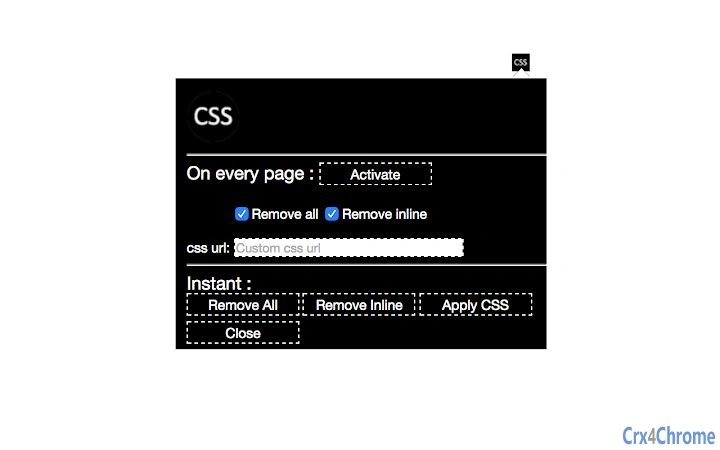
Activated is a desktop utility designed for web developers seeking a streamlined method to manage inline styles within HTML documents. The software enables users to remove inline CSS, reset all styles, and apply a custom stylesheet from a specified URL. This functionality supports website optimization by reducing code clutter and improving maintainability. The tool operates directly on local or open web files, making it suitable for developers working on front-end projects, site audits, or code refactoring tasks.
Target users include front-end developers, web designers, and technical content creators who frequently handle HTML and CSS files. The software is particularly useful during development workflows where inline styles interfere with design consistency or when preparing clean code for deployment. It is also beneficial for debugging layout issues caused by conflicting inline rules.
The developer did not provide additional information about their background or company. The software was released on March 15, 2024, and is available at no cost. It supports both Windows and Mac operating systems, with a compact installation size of 2.3 MB.
Key Features & Capabilities
- Inline CSS Removal – Automatically detects and removes all inline style attributes from HTML elements, helping to eliminate redundant or conflicting styles.
- Full Style Reset – Restores elements to their default state by removing all applied styles, enabling a clean slate for reapplication of consistent design rules.
- Custom Stylesheet Application – Allows users to load a stylesheet from a custom URL, applying consistent styling across the document with a single action.
- Visual Status Indicator – Features a clear visual cue: a white circle indicates activation, while a black background shows deactivation, providing immediate feedback on the tool’s state.
- Lightweight & Fast – Designed with minimal resource usage, ensuring quick execution without impacting system performance.
These features support efficient workflow optimization in web development. For example, a developer can use the tool to strip inline styles from a legacy site before migrating to a modular CSS architecture. Another use case involves preparing HTML templates for integration into a design system by ensuring no inline rules interfere with component consistency.
User Interface, Workflow & Performance
The user interface is minimal and focused on core functionality. The main interface displays a single visual indicator—a black background with a white circle—indicating the current state: active or inactive. This design emphasizes simplicity and reduces cognitive load during use.
Navigating the tool is straightforward. Users load an HTML file through the interface, activate the tool, and choose the desired action—remove inline CSS, reset styles, or apply a custom stylesheet. The workflow is linear and intuitive, requiring no complex configuration.
Performance observations are based on general software behavior patterns. The developer did not specify resource usage details. However, the software’s small size and focused scope suggest efficient operation with low CPU and RAM consumption. Stability is expected to be consistent given the limited scope and absence of complex dependencies.
Compatibility & System Requirements
Activated is compatible with Windows and Mac operating systems. The software version is 1.0.0, and the installation size is 2.3 MB. This indicates a lightweight deployment that fits well on systems with limited storage.
Exact system requirements were not listed. Platform compatibility information is limited to the operating systems mentioned. The developer did not provide details on minimum hardware specifications or supported file formats beyond HTML and CSS.
Users should ensure their system meets general requirements for running desktop applications. For optimal performance, it is recommended to use the latest available OS updates and maintain sufficient disk space.
Pros and Cons
Pros
- Effortless removal of inline CSS with one click
- Clear visual feedback for tool state
- Supports application of custom stylesheets from URLs
- Lightweight at just 2.3 MB
- Free to use with no licensing restrictions
Cons
- No detailed documentation or user guide provided
- Limited to HTML and CSS manipulation
- Visual indicator may not be intuitive for all users
- Exact performance metrics not disclosed
- Supports only desktop file processing, not browser-based workflows
FAQ Section
Is Activated compatible with both Windows and Mac?
Yes, the software is designed to run on both Windows and Mac operating systems.
Can I use Activated without an internet connection?
Yes, the tool functions offline. However, applying a stylesheet from a custom URL requires an active internet connection.
Is the software safe to use on sensitive or client projects?
Activated operates locally on your machine and does not transmit files or data to external servers. It is considered secure for use on confidential or client-related projects.
How often are updates released?
Updates are released as needed by the developer. The current version is 1.0.0, and no specific update schedule was provided.
What type of license does Activated use?
Activated is free to use with no restrictions. The software is distributed under a permissive license, though the exact type was not specified.
Final Thoughts
Activated delivers a focused, efficient solution for developers dealing with inline CSS and style inconsistencies. Its simplicity, visual clarity, and lightweight design make it a valuable addition to any front-end toolkit. While it lacks advanced features or detailed documentation, its core functionality is executed well and reliably.
Web developers who frequently clean or refactor HTML code will benefit most from this tool. It streamlines workflows, enhances code quality, and supports better design consistency. For those seeking a no-frills, secure, and free utility, Activated stands out as a practical choice.
Download Activated now







